Coupons & Discounts
Create percentage or fixed-amount discount codes with usage limits and expiry dates.
Overview
Coupons let you run promotions by giving customers a discount code they enter at checkout. DabDash supports three discount types: a percentage off the order total, a fixed dollar amount off, or free delivery. You can set usage limits, minimum order requirements, and optional start and expiry dates.
Customers enter a coupon code on the cart page. If the code is valid and active, the discount is applied immediately before they proceed to checkout.
Creating a Coupon
Click New Coupon in the top-right corner to open the coupon form.
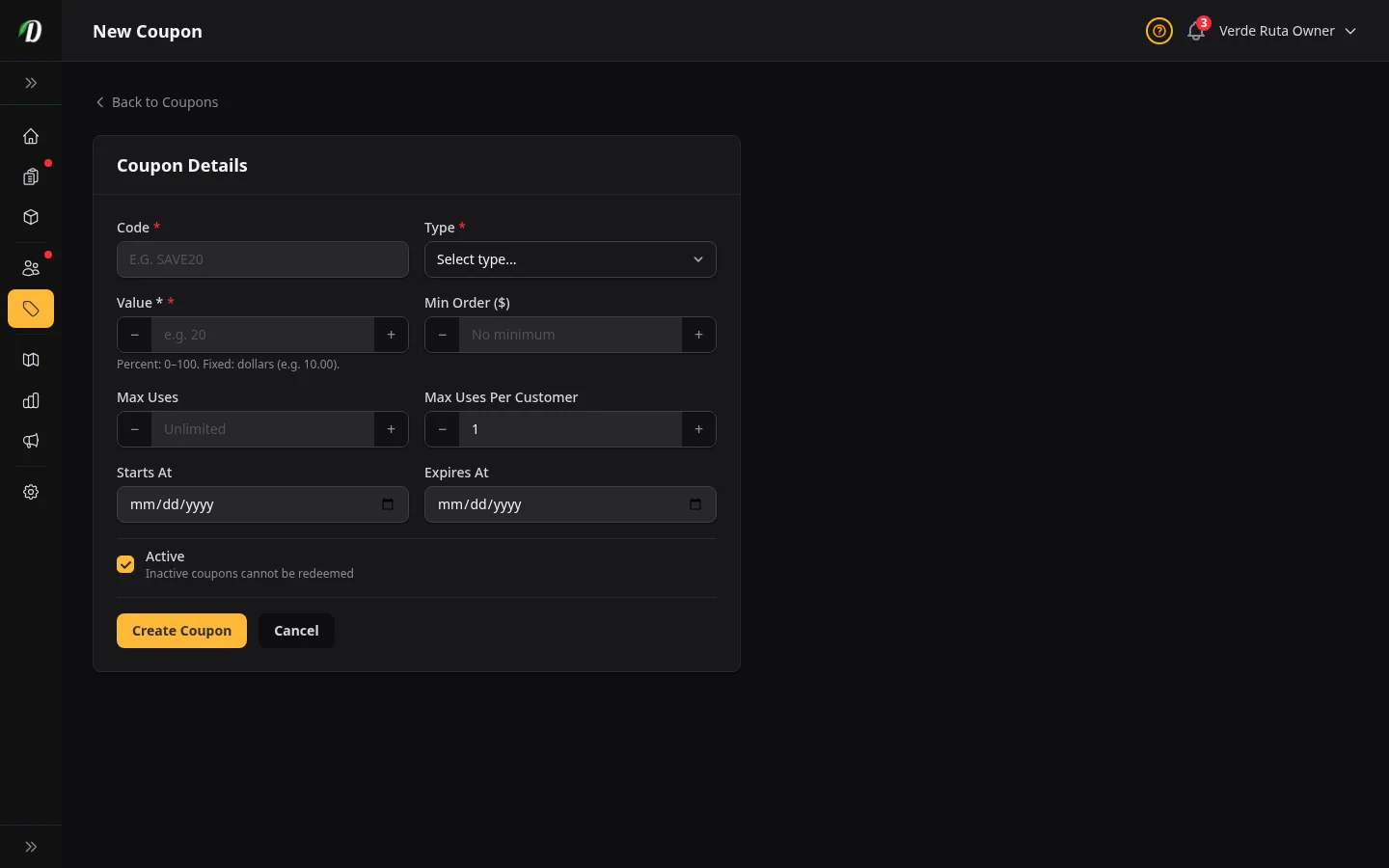
Fill in the coupon details:
- Code
- The text customers type at checkout — for example,
WELCOME20. Codes are stored in uppercase; customers can enter them in any case. Keep codes short and memorable. - Type
-
Choose one of three discount types:
- Percentage (%) — Takes a percentage off the subtotal. For example, 20% off a $100 order = $20 discount.
- Fixed ($) — Removes a flat dollar amount from the subtotal regardless of order size.
- Free Delivery — Waives the delivery fee entirely. No value field required.
- Value
- The discount amount. For percentage coupons, enter the percentage (e.g.,
20for 20% off). For fixed coupons, enter the dollar amount (e.g.,10.00). Not applicable for free delivery coupons. - Min Order ($)
- The minimum cart subtotal required before the coupon can be applied. Leave blank or enter 0 for no minimum. Useful for preventing loss on small orders — for example, require $40 minimum for a free delivery code.
- Max Uses
- The total number of times this coupon can be redeemed across all customers. Leave blank for unlimited uses. Once the limit is reached the code stops working automatically.
- Per Customer
- How many times a single customer can use this coupon. Defaults to 1. Set higher to allow repeat use by the same customer.
- Starts At / Expires At
- Optional date range controlling when the coupon is valid. Customers cannot apply the code before the start date or after the expiry date. Leave both blank for an always-valid coupon.
- Active
- Switch to enable or disable the coupon immediately. An inactive coupon cannot be redeemed even if the code and dates are valid.
Click Save to create the coupon.
Editing a Coupon Inline
Click the pencil icon in the Actions column on any coupon row. The row expands into an edit form directly in the table — no separate page needed. Change any fields and click Save Changes, or click Cancel to discard.
This inline editor supports all the same fields as the create form: code, type, value, minimum order, usage limits, start and expiry dates, and active status.
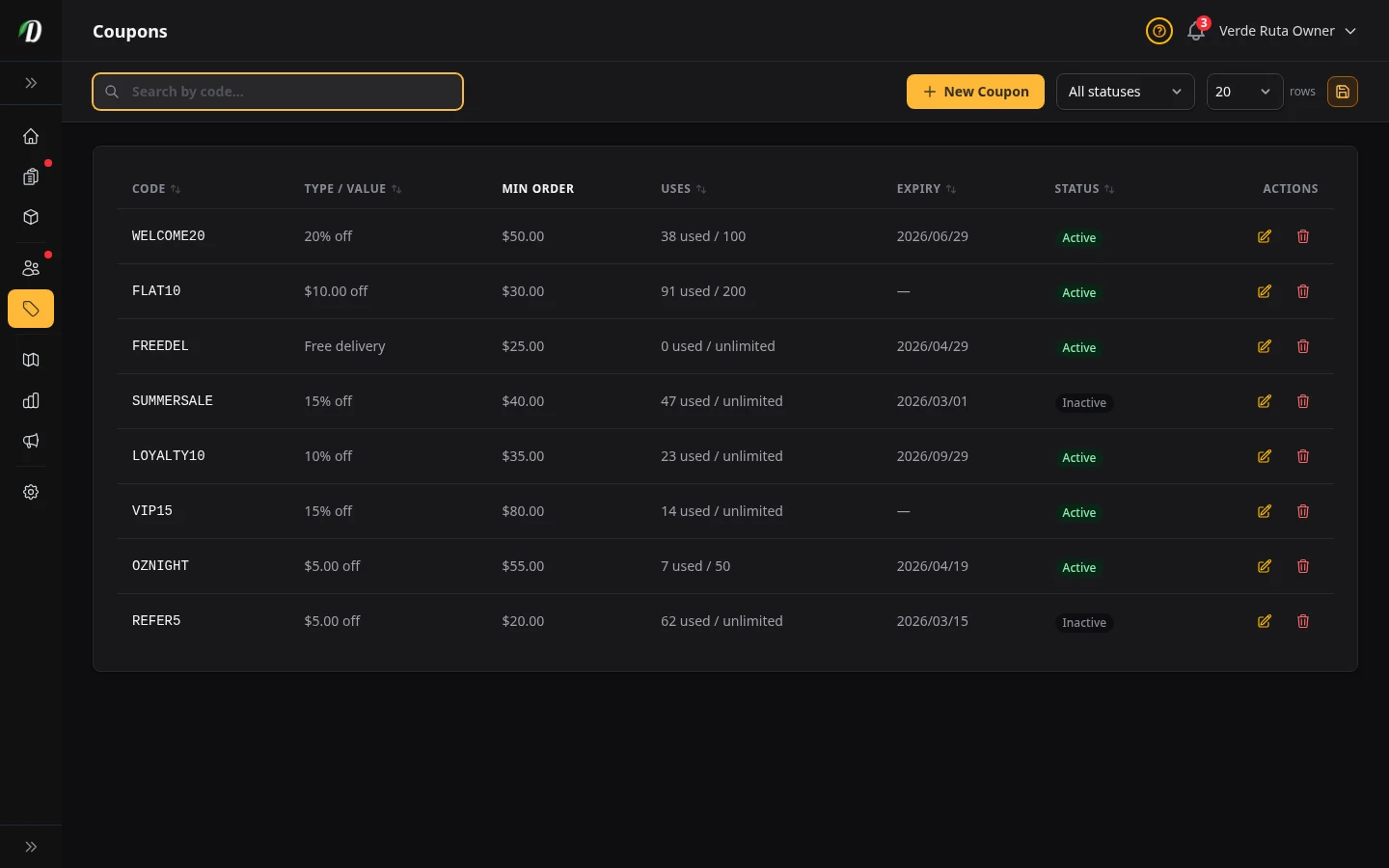
Reading the Coupons Table
- Code
- The coupon code in monospace font — exactly as customers must type it.
- Type / Value
- Shows the discount in plain language — "20% off", "$10.00 off", or "Free delivery".
- Min Order
- The minimum cart value required. Shows a dash (—) if there is no minimum.
- Uses
- Shows "used / maximum" — for example "12 used / 50". Shows "X used / unlimited" when there is no max uses limit. Monitor this to know when a campaign is running low.
- Expiry
- Shows the expiry date in relative terms — "in 3 days", "2 months ago". Expired coupons can no longer be redeemed. Shows a dash (—) for coupons with no expiry.
- Status
- Green "Active" or grey "Inactive" badge.
Tips
- Use a minimum order on free delivery codes to protect your margins — for example,
FREEDELwith a $35 minimum ensures customers spending more always qualify. - Set an expiry date on promotional codes to create urgency. "FLASH25" expiring tomorrow converts better than an open-ended discount.
- Set Max Uses to avoid runaway promotions. A "20% off" code without a limit can be shared virally and cost you significantly.
- Use Per Customer limit of 1 for welcome/referral codes so each customer only benefits once.
- Deactivate (don't delete) expired coupons so you can review historical campaign data later.
Frequently Asked Questions
How do I create a discount coupon code in DabDash?
Go to Coupons, click Create Coupon, enter a coupon code (e.g., WELCOME10), choose the discount type (percentage off, fixed amount off, or free delivery), set optional usage limits and expiry dates, and toggle it to Active. Customers can use the code at cart checkout.
Can I limit how many times a coupon can be used in DabDash?
Yes — set a maximum total usage count and a per-customer limit when creating the coupon. The coupon automatically deactivates once the total usage limit is reached, even if the expiry date hasn't passed yet.
Can I set a minimum order amount for a coupon in DabDash?
Yes — enter a minimum order amount when creating or editing a coupon. If a customer applies the code with a cart subtotal below that threshold, they'll see an error message explaining the minimum required. The discount is not applied until the threshold is met.